---
title: Set up Local OpenLDAP as an Identity Provider in ZITADEL
sidebar_label: Local OpenLDAP
---
import Intro from './_intro.mdx';
import CustomLoginPolicy from './_custom_login_policy.mdx';
import IDPsOverview from './_idps_overview.mdx';
import GeneralConfigDescription from './_general_config_description.mdx';
import Activate from './_activate.mdx';
import TestSetup from './_test_setup.mdx';
import HowLDAPIDPWorks from './_how_ldap_idp_works.mdx'
This guide shows you how you can configure an LDAP server locally.
ZITADEL needs access to the LDAP server, so this won't work in ZITADEL Cloud.
You have to spin up your own local ZITADEL.
The easiest way to do so is [by following the Docker Compose installation guide](/self-hosting/deploy/compose).
Beware that these example settings neither supports LDAPS nor StartTLS.
We highly recommend to enable LDAPS or StartTLS in your production setup.
Otherwise, your users passwords are sent in clear text through the wire.
## How it works
## OpenLDAP Configuration
### Basic settings
You can run OpenLdap via `docker-compose` using the following:
```
version: '2'
networks:
my-network:
driver: bridge
services:
openldap:
image: bitnami/openldap:latest
ports:
- '389:1389'
environment:
- LDAP_ADMIN_USERNAME=admin
- LDAP_ADMIN_PASSWORD=Password1!
- LDAP_USERS=test
- LDAP_PASSWORDS=Password1!
- LDAP_ROOT=dc=example,dc=com
- LDAP_ADMIN_DN=cn=admin,dc=example,dc=com
networks:
- my-network
volumes:
- 'openldap_data:/bitnami/openldap'
volumes:
openldap_data:
driver: local
````
Alternatively, you can run LDAP locally. To run LDAP locally to test it with ZITADEL please refer to [OpenLDAP](https://www.openldap.org/) with [slapd](https://www.openldap.org/software/man.cgi?query=slapd).
For a quickstart guide please refer to their [official documentation](https://www.openldap.org/doc/admin22/quickstart.html).
A basic configuration would be like this
```
#
# See slapd.conf(5) for details on configuration options.
# This file should NOT be world readable.
#
include /usr/local/etc/openldap/schema/core.schema
include /usr/local/etc/openldap/schema/cosine.schema
include /usr/local/etc/openldap/schema/inetorgperson.schema
include /usr/local/etc/openldap/schema/nis.schema
include /usr/local/etc/openldap/schema/misc.schema
# Define global ACLs to disable default read access.
# Do not enable referrals until AFTER you have a working directory
# service AND an understanding of referrals.
#referral ldap://root.openldap.org
pidfile /usr/local/var/run/slapd.pid
argsfile /usr/local/var/run/slapd.args
# Load dynamic backend modules:
modulepath /usr/local/Cellar/openldap/2.4.53/libexec/openldap
moduleload back_mdb.la
moduleload back_ldap.la
# Sample security restrictions
# Require integrity protection (prevent hijacking)
# Require 112-bit (3DES or better) encryption for updates
# Require 63-bit encryption for simple bind
# security ssf=1 update_ssf=112 simple_bind=64
# Sample access control policy:
# Root DSE: allow anyone to read it
# Subschema (sub)entry DSE: allow anyone to read it
# Other DSEs:
# Allow self write access
# Allow authenticated users read access
# Allow anonymous users to authenticate
# Directives needed to implement policy:
# access to dn.base="" by * read
# access to dn.base="cn=Subschema" by * read
# access to *
# by self write
# by users read
# by anonymous auth
#
# if no access controls are present, the default policy
# allows anyone and everyone to read anything but restricts
# updates to rootdn. (e.g., "access to * by * read")
#
# rootdn can always read and write EVERYTHING!
#######################################################################
# MDB database definitions
#######################################################################
database ldif
#maxsize 1073741824
suffix "dc=example,dc=com"
rootdn "cn=admin,dc=example,dc=com"
# Cleartext passwords, especially for the rootdn, should
# be avoid. See slappasswd(8) and slapd.conf(5) for details.
# Use of strong authentication encouraged.
rootpw {SSHA}6FTOTIITpkP9IAf22VjHqu4JisyBmW5A
# The database directory MUST exist prior to running slapd AND
# should only be accessible by the slapd and slap tools.
# Mode 700 recommended.
directory /usr/local/var/openldap-data
# Indices to maintain
#index objectClass eq
```
Which are the default settings with an admin user under the DN `cn=admin,dc=example,dc=com` and password `Password1!`, BaseDN `"dc=example,dc=com` and database set to `ldif`.
In addition, there are some schemas included which can be used to create the users.
### Example users
For a basic structure and an example user you can use this structure in a `.ldif` file:
```
dn: dc=example,dc=com
dc: example
description: Company
objectClass: dcObject
objectClass: organization
o: Example, Inc.
dn: ou=people, dc=example,dc=com
ou: people
description: All people in organisation
objectclass: organizationalunit
dn: cn=test,ou=people,dc=example,dc=com
objectclass: inetOrgPerson
cn: testuser
sn: test
uid: test
userpassword: {SHA}qUqP5cyxm6YcTAhz05Hph5gvu9M=
mail: test@example.com
description: Person
ou: Human Resources
```
Which in essence creates a user with DN `cn=test,ou=people,dc=example,dc=com`, uid `test` and password `test`.
The user can be applied after OpenLDAP is running with
```bash
ldapadd -x -h localhost -D "cn=admin,dc=example,dc=com" -f example.ldif -w 'Password1!'
```
## ZITADEL Setup
### Go to the IdP Providers Overview
### Create a new LDAP Provider
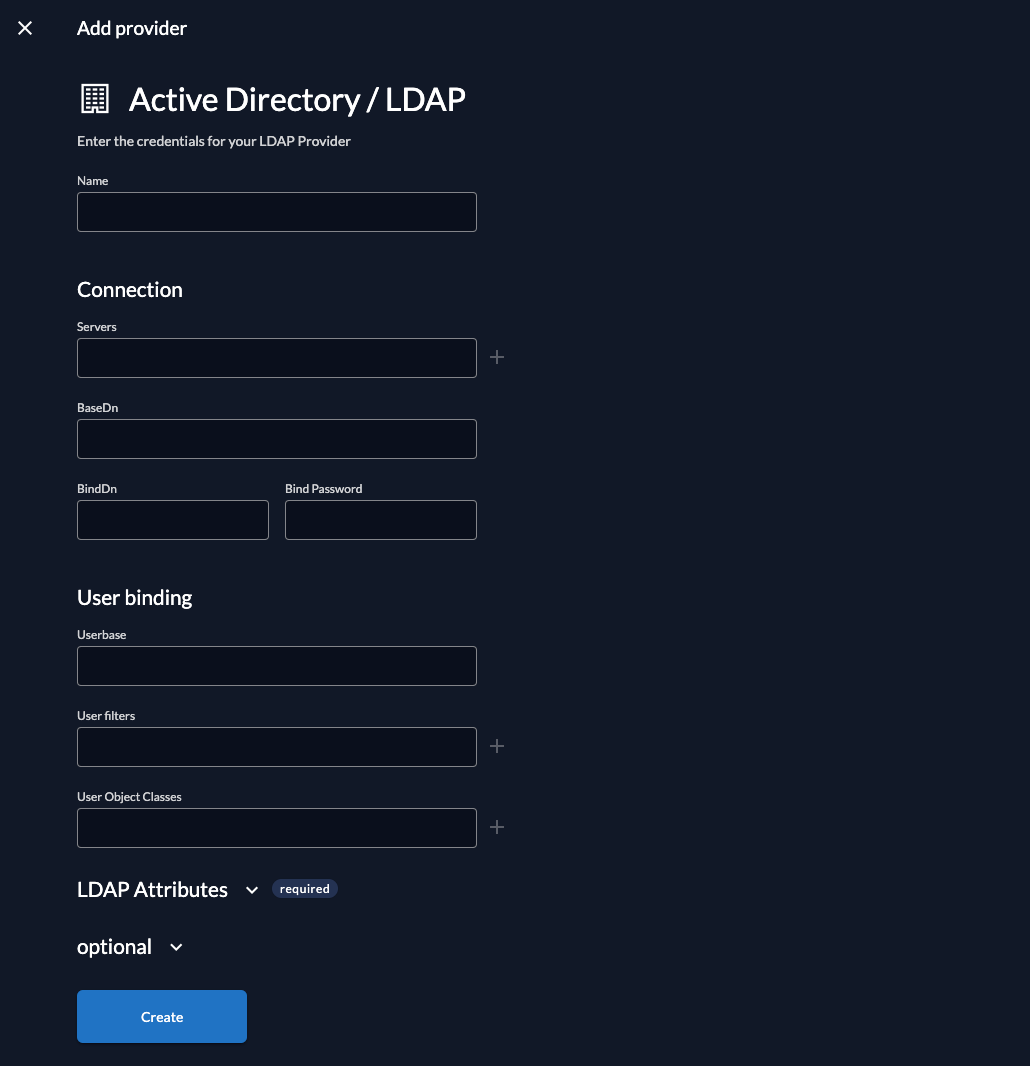
Fill in the template fields with the exact values listed below. The fields are described in the [LDAP guide](./ldap#create-a-new-ldap-provider).
**Name**: OpenLDAP
**Servers**: "ldap://localhost:389"
**BaseDN**: "dc=example,dc=com"
**BindDn**: "cn=admin,dc=example,dc=com"
**BindPassword**: "Password1!"
**Userbase**: "dn"
**User filters**: "uid"
**User Object Classes**: "inetOrgPerson"
**LDAP Attributes**: id attributes = "uid"
**StartTLS**: For this example should be left untouched, if this setting is enabled after the initial connection ZITADEL tries to build a TLS connection.
**Timeout**: Can be left empty, if this setting is set all connection run with a set timeout, if it is 0s the default timeout of 60s is used.
### Activate IdP

### Ensure your Login Policy allows External IDPs
## Test the setup