---
title: Embed Authenticated MongoDB Charts Using ZITADEL
sidebar_label: Authenticated MongoDB Charts
---
This integration guide shows how you can embed authenticated MongoDB Charts in your web application using ZITADEL as authentication provider.
## Setup ZITADEL Application
Before you can embed an authenticated chart in your application, you have to do a few setup steps in ZITADEL Console.
You will need to provide some information about your app. We recommend creating a new app to start from scratch.
1. Navigate to your Project
2. Add a new application at the top of the page.
3. Select Web application type and continue.
4. Use [Authorization Code](/apis/openidoauth/grant-types#authorization-code) in combination with [Proof Key for Code Exchange (PKCE)](/apis/openidoauth/grant-types#proof-key-for-code-exchange).
5. Skip the redirect settings and confirm the app creation
6. Copy the client ID, you will need to tell MongoDB Charts about it.
7. When you created the app, expand its _OIDC Settings_ section, change the _Auth Token Type_ to JWT
Your application settings should now look similar to this:

## Setup Custom JWT Provider for MongoDB Charts
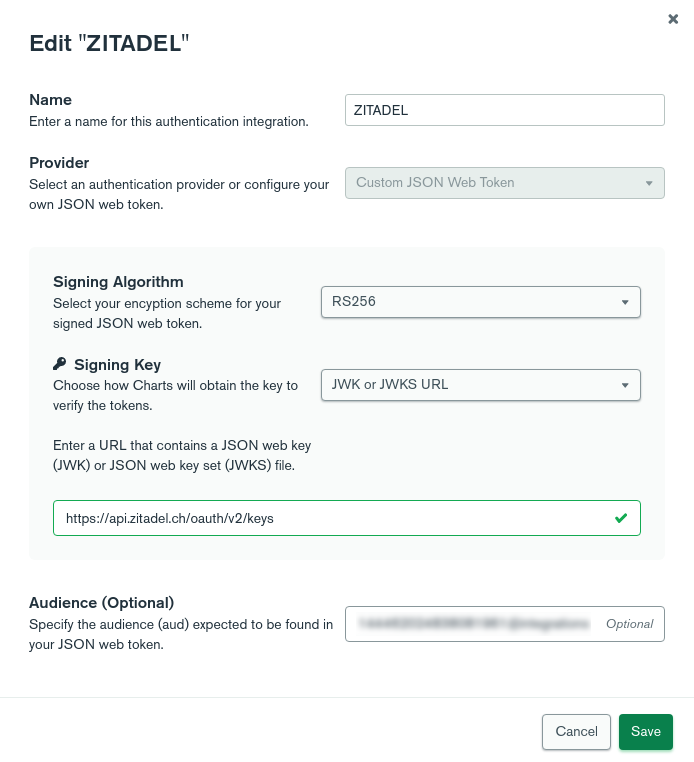
Configure ZITADEL as your _Custom JWT Provider_ following the [MongoDB docs](https://docs.mongodb.com/charts/configure-auth-providers/) .
Configure the following values:
- Signing Algorithm: RS256
- Signing Key: JWK or JWKS URL
- JWKS: https://$CUSTOM_DOMAIN/oauth/v2/keys
- Audience: Your app's client ID which you copied when you created the ZITADEL app
Your settings should look similar to this:
## Embedding your Chart
Embed a chart into your application now, following the corresponding [MongoDB docs](https://docs.mongodb.com/charts/saas/embed-chart-jwt-auth/).
If you've done the [Angular Quickstart](/examples/login/angular), your code could look something like this:
```html
```
```css
/* chart.component.css */
div#chart {
height: 500px;
}
```
```ts
// chart.component.ts
@Component({
selector: 'app-chart',
templateUrl: './chart.component.html',
styleUrls: ['./chart.component.css']
})
export class ChartComponent implements OnInit {
constructor(private auth: AuthenticationService) { }
ngOnInit(): void {
this.renderChart().catch(e => window.alert(e.message));
}
async renderChart() {
const sdk = new ChartsEmbedSDK({
baseUrl: "",
getUserToken: () => {
return this.auth.getAccessToken()
},
});
const chart = sdk.createChart({
chartId: ""
});
await chart.render(document.getElementById("chart"));
}
}
```